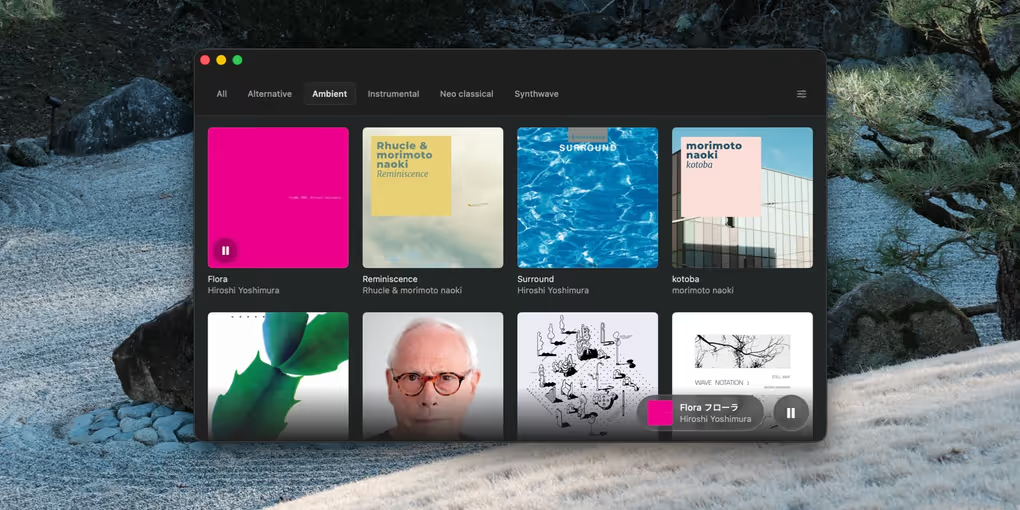
Albums
Why I vibed it
I'm tired of software that's always changing based on the company's needs, not mine. Promoting artists I don't care to see. I've started purchasing music again because that feels good. I never make playlists and only listen to whole albums all the way through. I vibed Albums because I wanted a music player that just did that really well.
What it does
You set the location of your music folder and it will present you with a clean and simple UI for playing your albums. You can organize your albums into collections based on genre, mood, or whatever you like.
How I use it
This is how I listen to music on my computer now. I buy music from Bandcamp, download it to my music folder, and enjoy it without any nonsense. Ocassionally I'll still open up Spotify but only to hunt for something new.
Changelog
2026.08.03
- Album covers are now chosen by consensus across an album's tracks, so a mistagged single no longer hijacks the artwork - and a wrong cover gets corrected on the next scan instead of being cached forever
- Cover art is decoded before the floating player's card-flip begins, so the new artwork is revealed by the animation instead of popping in after it
2026.07.11
- Enlarged the floating player controls - bigger cover art, track text, and play/pause button for better legibility
2026.07.01
- Fixed playback getting stuck at the end of an album (pressing play would instantly re-pause)
2026.06.23
- Added sorting options under Settings / General / Display
2026.06.22
- Rebuilt from the ground up as a native macOS app - the download dropped from ~130 MB to under 2 MB, and it launches instantly
- New Liquid Glass design with a floating now-playing player and a full-screen album view
- Drag a folder onto the window to add an album to your library. Drop it while a collection is selected and it joins that collection too
- Settings now has a General tab with theme and a volume control
2026.06.06
- Added macOS Dock menu controls. Right-click the Dock icon to Play/Pause, skip to the Next or Previous track, and see what's currently playing
2026.05.23
- Fixed typography issues in tabs and buttons
2026.05.22
- Added support for Next / Previous Track hardware media keys
- Albums now sync asynchronously, so your collections appear instantly on launch
- Streamlined empty state