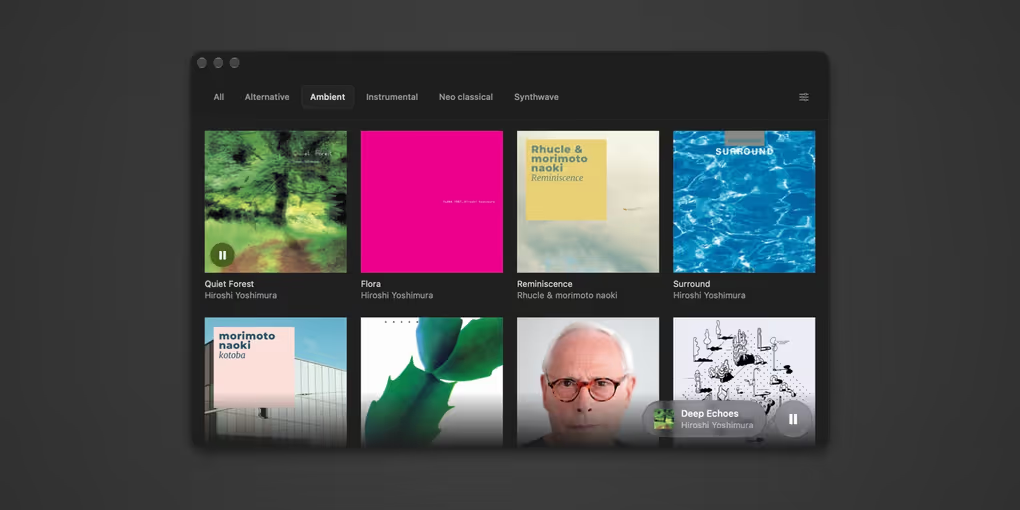
Albums
Why I vibed it
I'm tired of software that's always changing based on the company's needs, not mine. Promoting artists I don't care to see. I've started purchasing music again because that feels good. I never make playlists and only listen to whole albums all the way through. I vibed Albums because I wanted a music player that just did that really well.
What it does
You set the location of your music folder and it will present you with a clean and simple UI for playing your albums. You can organize your albums into collections based on genre, mood, or whatever you like.
How I use it
This is how I listen to music on my computer now. I buy music from Bandcamp, download it to my music folder, and enjoy it without any nonsense. Ocassionally I'll still open up Spotify but only to hunt for something new.
Changelog
2026.10.19
- New “Sync from Another Mac…” command discovers shared Albums libraries on your local network and lets you choose albums to copy.
- Sync copies original audio and cover art, merges collection memberships, and skips identical music already in your library.
- Transfers verify files before importing. Existing music is preserved, and retrying after a disconnect copies only missing tracks.
2026.10.12
- Albums remembers the last track you were on and has it ready when you reopen the app, without starting playback.
- New "Simplify track titles" setting hides bracketed extras like "(feat. …)" or "[Live]" in the player and Dock menu.
- Turn off "Keep my music organized" to import music with its existing folders and filenames.
- Organize Folder can now fix capitalization in file and folder names, highlights those changes in orange, and gives a clearer summary when it's done.
- The album view stacks the cover above the title in narrow windows.
- Simpler Sync settings.
2026.10.07
- Organize your music folder into artist and album folders, with a preview before moving files.
- Import music from Downloads into your library, with duplicate detection and an option to move verified originals to Trash.
- Improved track ordering and sync reliability with the iPhone and Apple Watch companion apps, including keeping track identities stable when music is reorganized.
- Refined collections, settings, and track lists, plus now-playing information and playback controls in the Dock menu.
2026.08.03
- Album covers are now chosen by consensus across an album's tracks, so a mistagged single no longer hijacks the artwork - and a wrong cover gets corrected on the next scan instead of being cached forever
- Cover art is decoded before the floating player's card-flip begins, so the new artwork is revealed by the animation instead of popping in after it
2026.07.11
- Enlarged the floating player controls - bigger cover art, track text, and play/pause button for better legibility
2026.07.01
- Fixed playback getting stuck at the end of an album (pressing play would instantly re-pause)
2026.06.23
- Added sorting options under Settings / General / Display
2026.06.22
- Rebuilt from the ground up as a native macOS app - the download dropped from ~130 MB to under 2 MB, and it launches instantly
- New Liquid Glass design with a floating now-playing player and a full-screen album view
- Drag a folder onto the window to add an album to your library. Drop it while a collection is selected and it joins that collection too
- Settings now has a General tab with theme and a volume control
2026.06.06
- Added macOS Dock menu controls. Right-click the Dock icon to Play/Pause, skip to the Next or Previous track, and see what's currently playing
2026.05.23
- Fixed typography issues in tabs and buttons
2026.05.22
- Added support for Next / Previous Track hardware media keys
- Albums now sync asynchronously, so your collections appear instantly on launch
- Streamlined empty state